Starters, mains and desserts change every morning. With BuenaCarta you set up your daily menu from your phone in a couple of minutes: switch on today's dishes, switch off the rest, and your customers see it instantly when they scan the QR code. And if anyone prefers it on paper, you print it in one click.
The daily set menu: the part of your menu that changes the most
A restaurant's à la carte menu can last for months, but the daily set menu changes, as the name says, every day. And it's nearly always handled the same way: a chalkboard that has to be rewritten, photocopies that are out of date by mid-morning, or a waiter reciting the dishes table by table while the work piles up.
With BuenaCarta, the daily menu is just another menu within your digital menu, with its own price, dishes and date, and it's designed to be changed quickly: you don't rewrite anything, you just choose which dishes are on today.
Set it up once: your usual dishes, saved
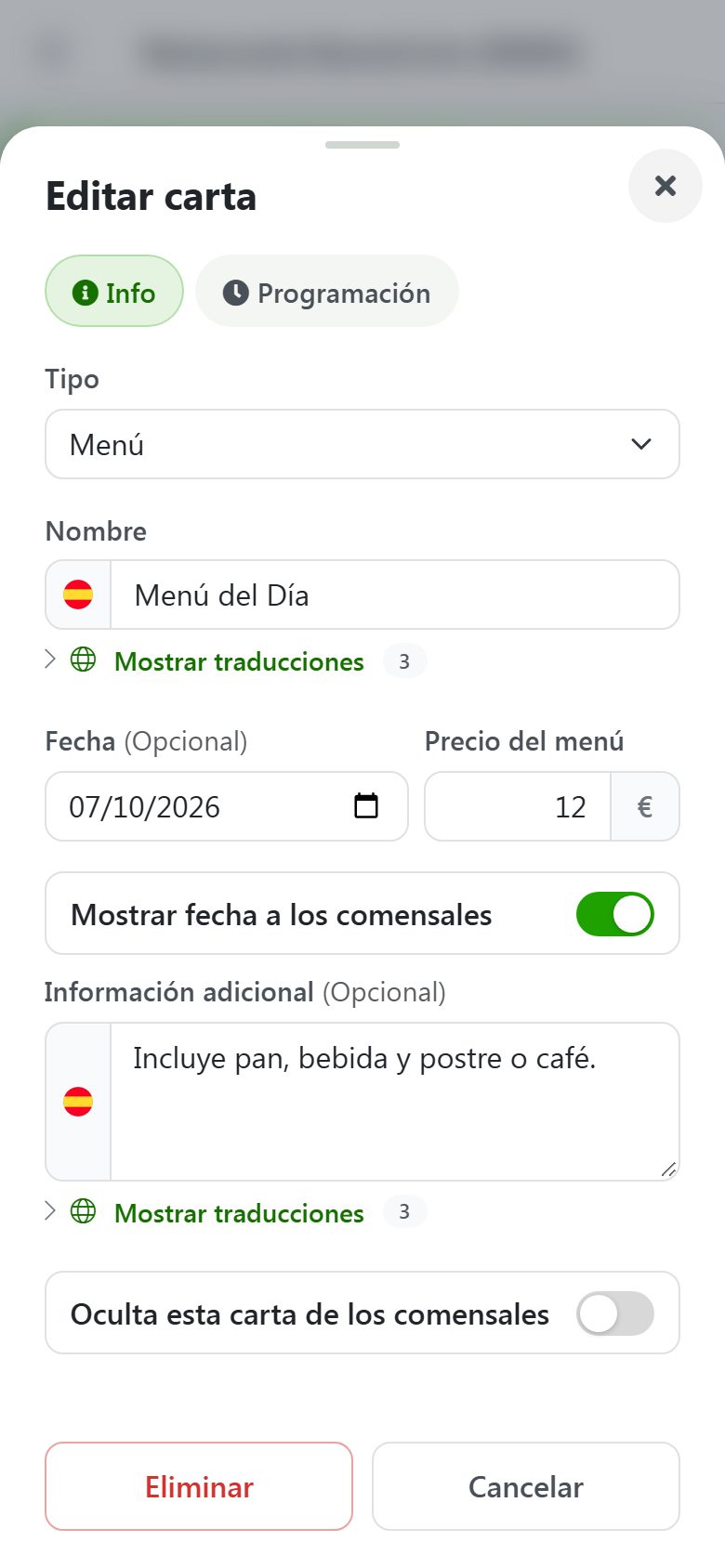
When you create a new menu, choose the Set menu type ("Choose from several with a fixed price") and fill in the basics:
Set menu price: the customer sees a single fixed price, not the price of each dish.
Date, if you want your customers to see which day the menu is for.
Additional information: "Includes bread, a drink and dessert or coffee", "Lunchtime only", "Half menu: €9"… whatever you need to tell them.
Sections to organise it: starters, mains, desserts, drinks… with the names you use in your restaurant.
Then add all the dishes you usually make, not just today's: Monday's lentils, Thursday's chickpea stew, the hake, the steaks, the homemade flan… Each dish with its description, its allergens and, if you like, a photo. You only have to do this once.
Set menu price, date and information
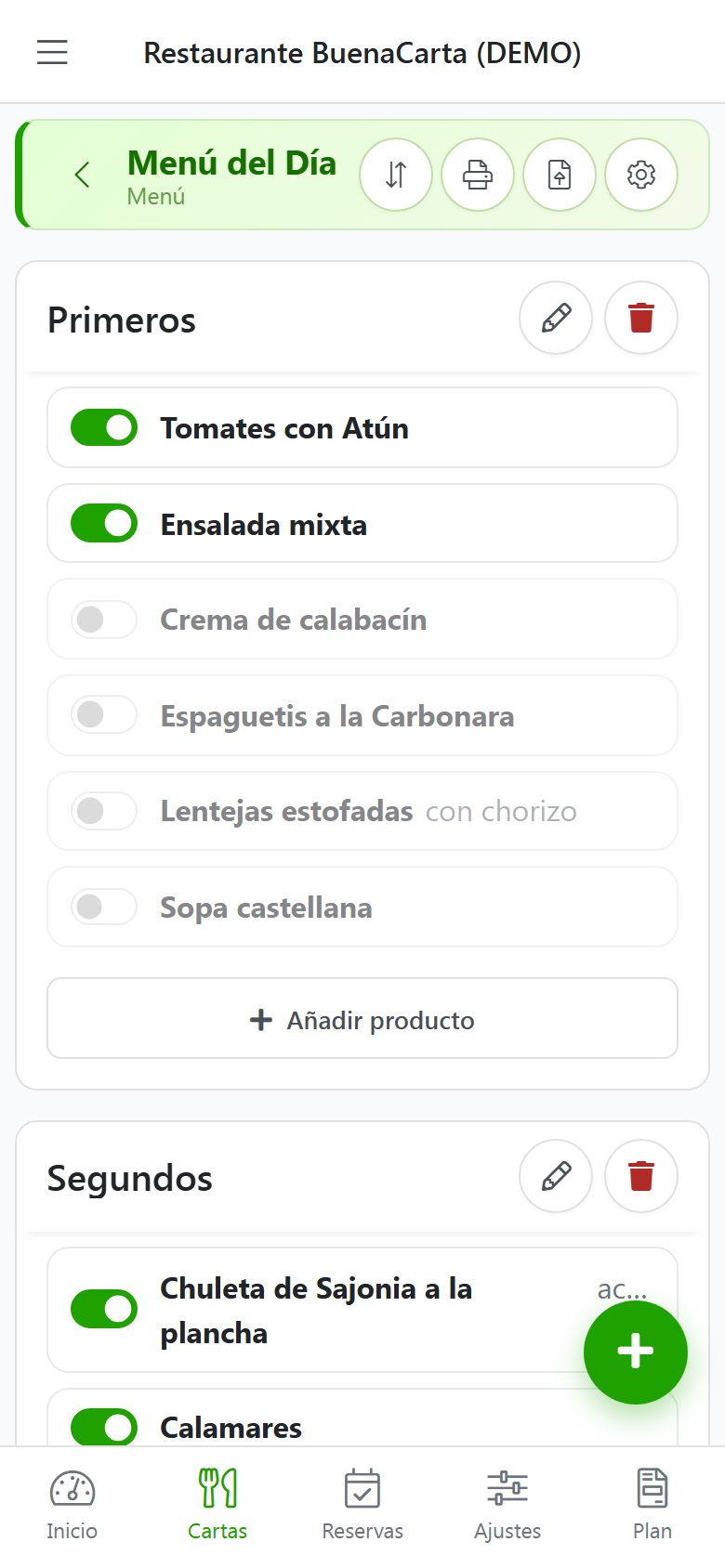
One switch per dish
Every morning, switch dishes on and off
This is the clever part. Every dish on the menu has a switch in your dashboard. Open the app on your phone, switch on today's dishes and switch off the rest. No forms, no saving, no rewriting: every tap takes effect immediately.
Dishes you switch off aren't deleted: they stay saved at the end of their section, with their description and allergens, ready for the day you make them again.
If you have lots of saved dishes, a search box appears so you can find the one you want to switch on without scrolling through the whole list.
A new dish? Add it in a moment, and from that day on it's part of your repertoire.
Run out halfway through lunch? Mark it as sold out and it shows as such on the menu, so nobody orders it.
Price change? Edit it in the same place, and the date too.
Your customers see the changes the moment you make them. The QR code never changes, so the sticker on the table or the sign on the door works forever, however much the menu changes.
What your customers see when they scan the QR code
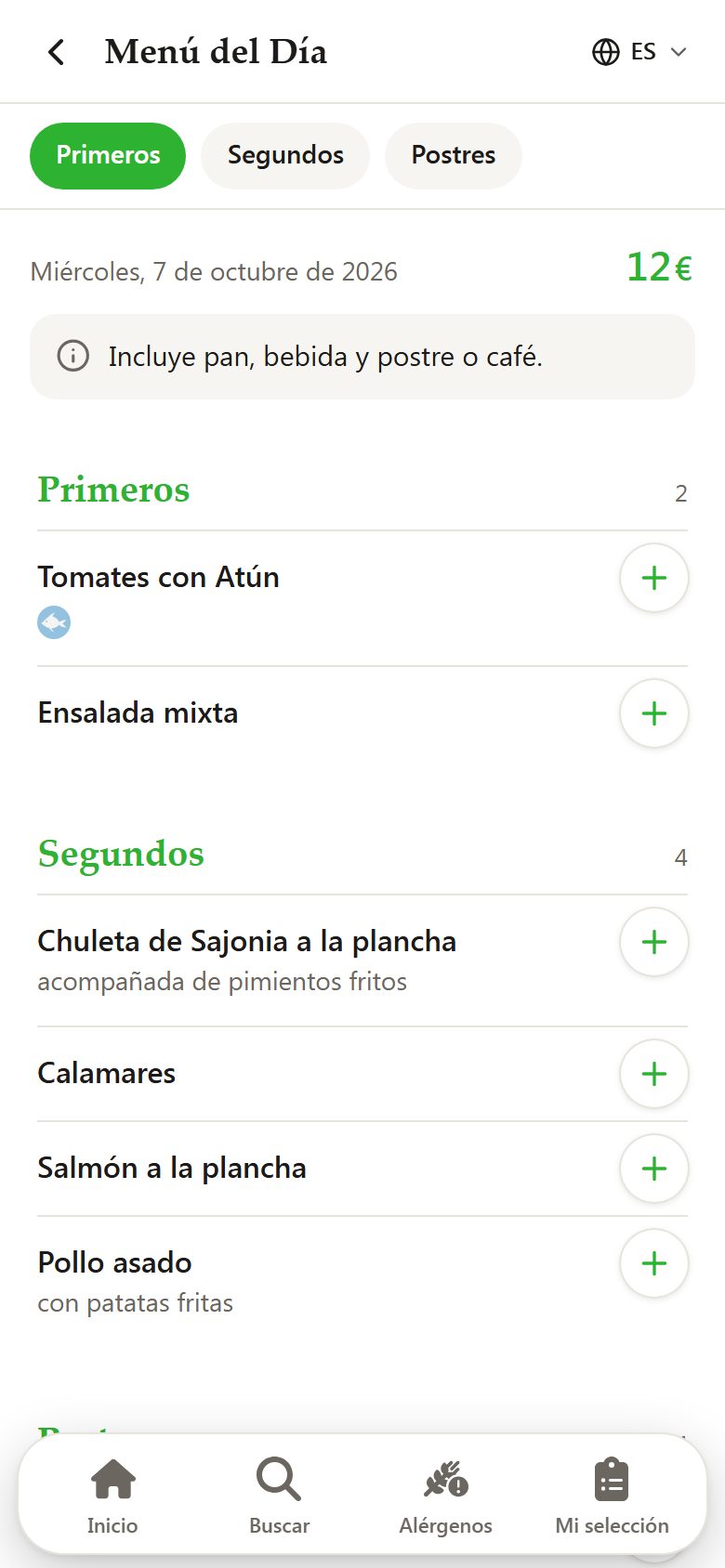
When they scan the code, your customers find the daily menu alongside the rest of your menus, with the price clearly displayed, the date, the additional information and only today's dishes, sorted into starters, mains and desserts. If a dish has allergens, they see them with their icons; and if they're visiting from abroad, they read it in their own language.
The daily menu on the customer's phone
And on paper, for those who need it
There are always people who prefer to read the menu on paper: older customers, someone who left their phone in the car, a large group or the terrace where the signal is poor. And it can come in handy for you too, for the shop window, the bar or the kitchen.
From the same dashboard you print the menu as a PDF in one click, with the dishes you have switched on at that moment: the ones switched off are left out. Keep a few copies to hand and, if you change something mid-morning, just print it again.
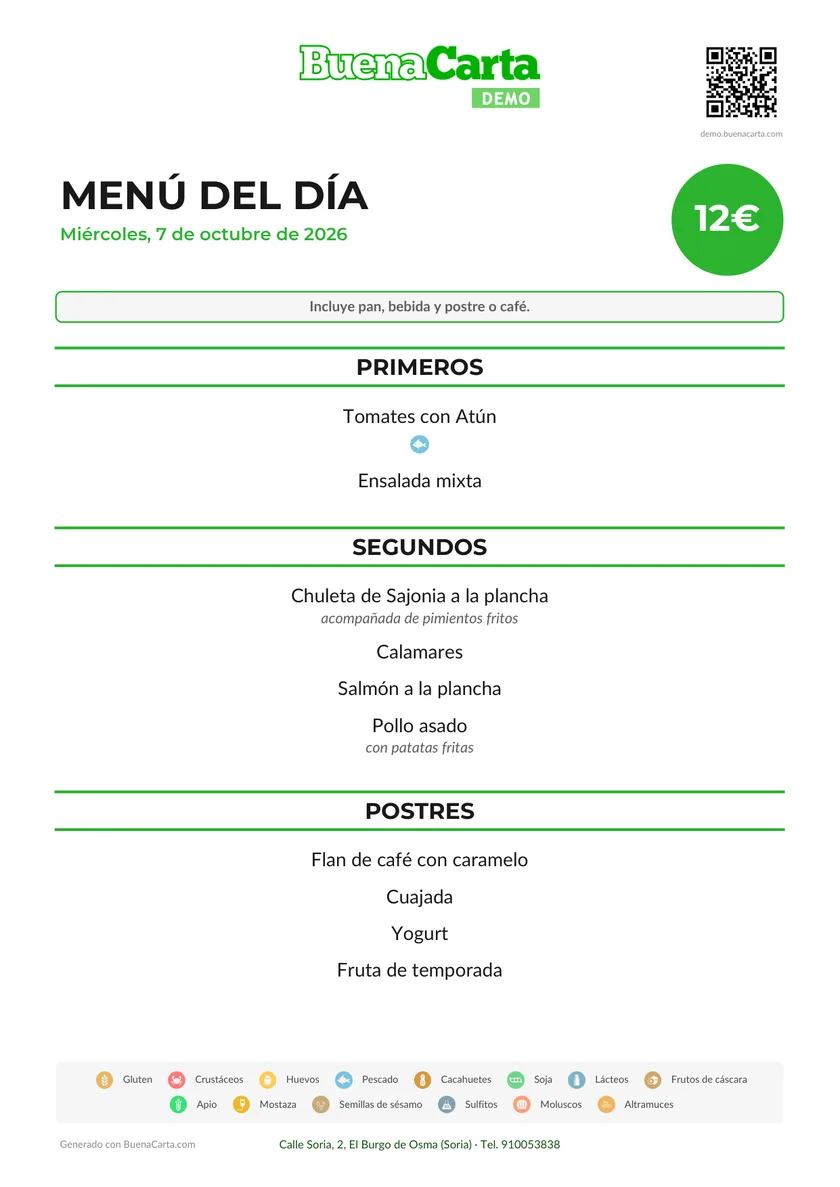
A dedicated design for the daily menu, with the price highlighted in a circle, the date clearly visible and the additional information in a banner.
In the size you use: A4, A5 for the tables or A3 for the window.
With or without allergens, with your logo and the QR code for anyone who prefers to view it on their phone.
Just the daily menu: each menu is printed separately, so you don't have to reprint your whole menu.
The daily menu ready to print on A4
Lunchtime only, weekdays only
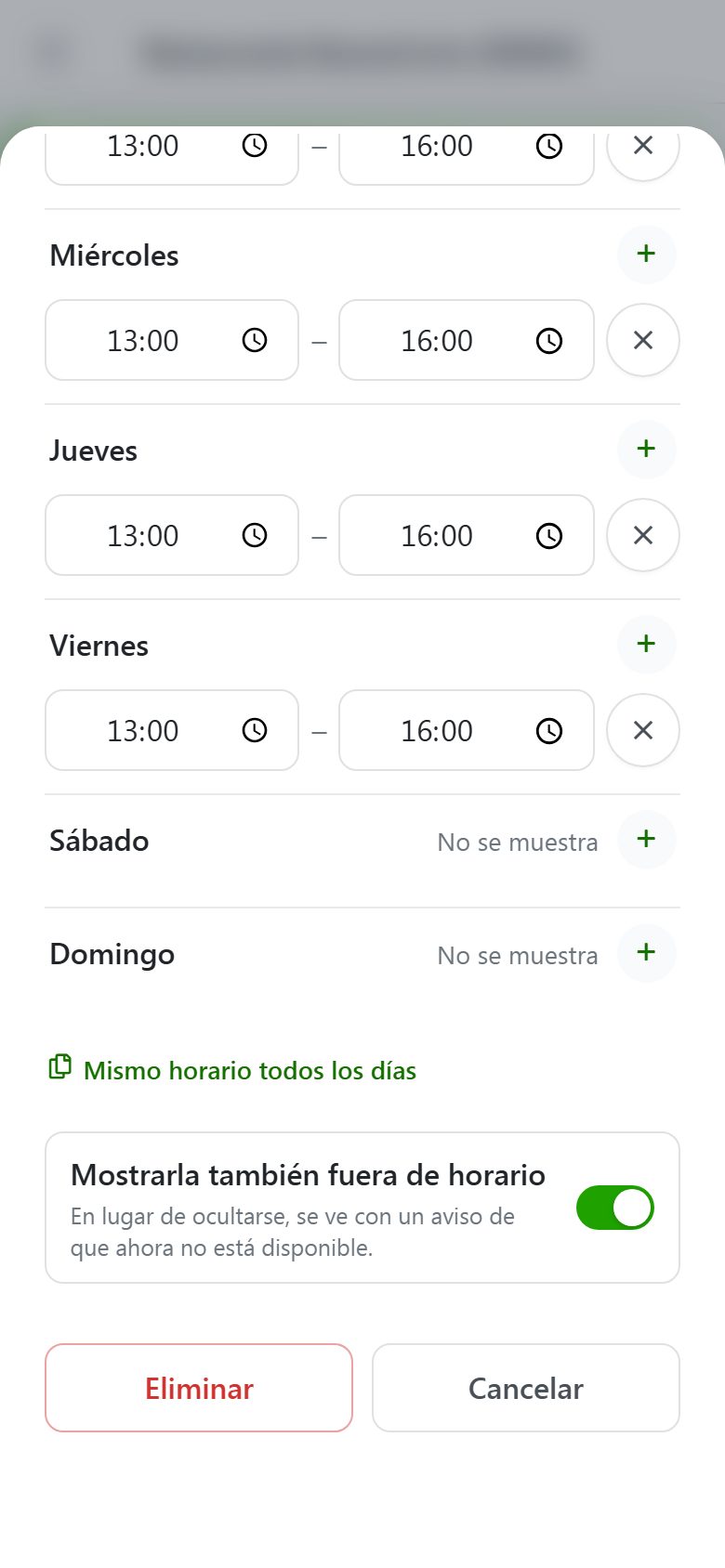
Many restaurants serve the daily set menu only at lunchtime and from Monday to Friday, and work from the à la carte menu in the evenings and at weekends. With BuenaCarta's scheduling you set the days and times the menu is shown, and outside those hours it automatically disappears from your QR menu, or shows as "Not available right now", whichever you prefer.
Set it up once and forget about it: no more remembering to hide the menu every Friday afternoon.
Menu days and times
Allergens and languages, on the menu too
The rules on allergens in restaurants also apply to the daily set menu. Since each dish keeps its allergens, they appear with it the day you switch it on, without you having to check them every morning.
And if you have customers from abroad, AI translation translates your dishes into 11 languages as soon as you write them. Since the dishes on your menu are already translated, switching them on each morning means no extra work.
Tips for a daily menu that works
Describe your dishes: "Battered hake with salad" sells better than "Fish".
Use the additional information for what people always ask you: what's included, whether there's a half menu or whether bread and coffee are extra.
Make the change first thing, before the first customers arrive, and save the rush of service for what matters.
Put up a sign: a QR code on the door or in the window lets passers-by see the menu before they come in.
Check the date if you show it to your customers: a menu with yesterday's date looks careless.
Frequently asked questions about the daily menu
Yes. The BuenaCarta dashboard is designed to be used from your phone, in the browser or with our app. Switching a dish on or off takes a single tap.
No. The dishes you're not serving today stay switched off and saved, with their description and allergens. The day you make them again, just switch them on and you're done.
No time at all: as soon as you switch a dish on or off, the QR menu already shows it. The QR code is always the same.
Yes. The daily menu is just another menu, and your customers see all your menus when they scan the same QR code. You can also schedule the menu so it only appears on the days and at the times you serve it.
Yes. Each menu is printed separately, with a design specific to the daily menu and only the dishes you have switched on at that moment.
Mark it as sold out or switch it off. If you mark it as sold out, your customers still see it, but with a notice that there's none left.
Keep your daily menu up to the minute
Create your menu, add your usual dishes and, every morning, switch on today's. Your customers will see it instantly.